Meccha Chameleon hiding spots across 5 maps
A practical spot database with 77 hiding ideas, local screenshots, hider setup notes, and seeker counterplay. Use it as a route planner before private lobbies or fast public games.
77
spots
5
maps
2-way
hider and seeker notes
Best starting points
Spots worth testing first
Start with repeated object groups, high corners, and cluttered prop piles. These spots are easier to explain, test, and counter-check.
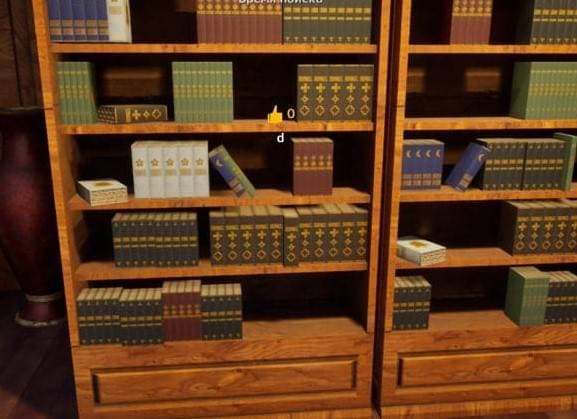
Bookcase row
One extra vertical shape is hard to count inside a dense book row.
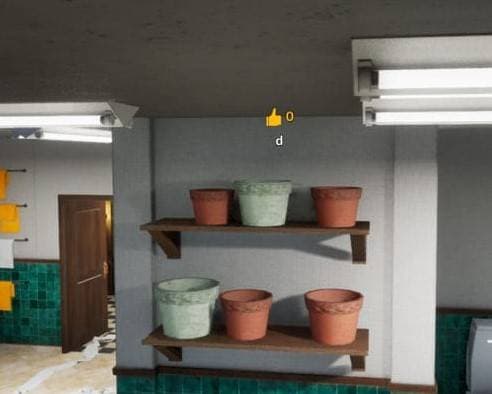
Flowerpot row
A full pot row is hard to count under time pressure.
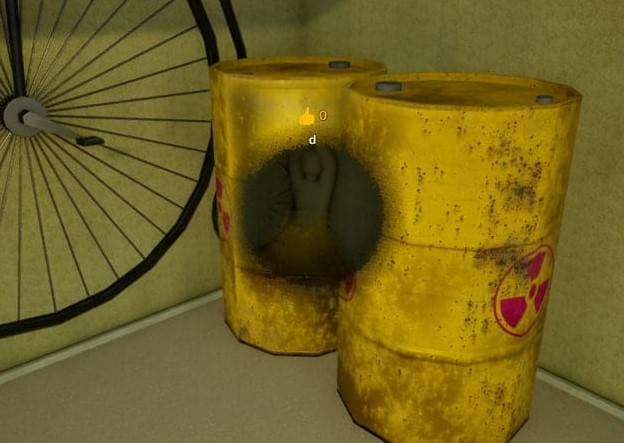
Yellow industrial barrel
A repeated container group is difficult to count quickly.
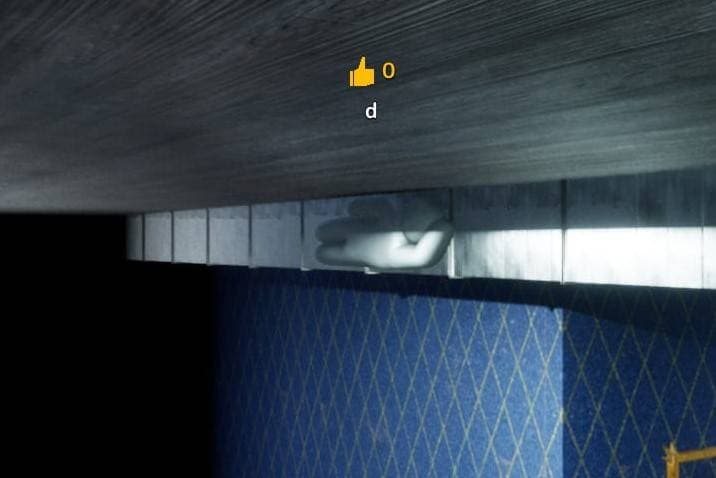
High dark corner
Seekers often miss high angles during fast sweeps.
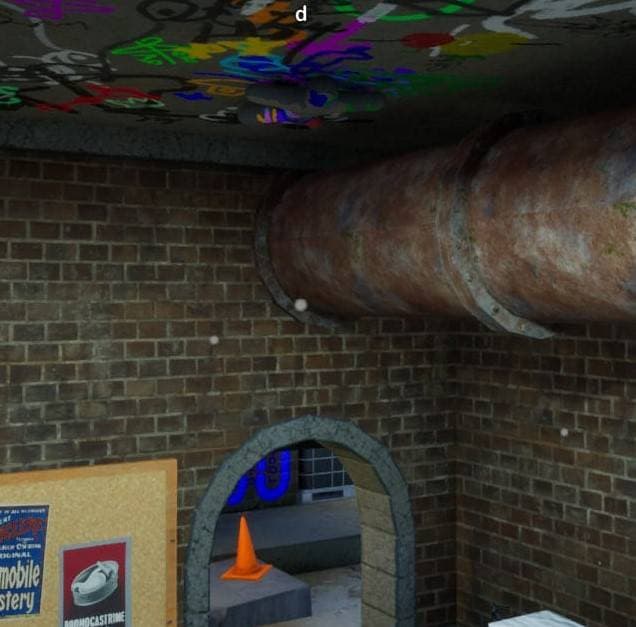
High ceiling pipe
Most seekers clear floor clutter before checking the ceiling.
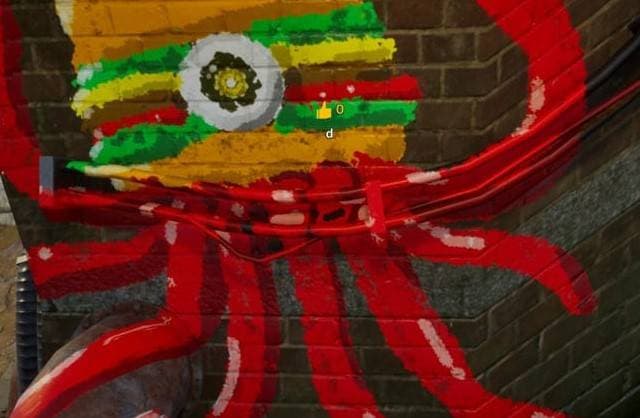
Red octopus graffiti
The wall art makes an unusual red shape feel intentional.
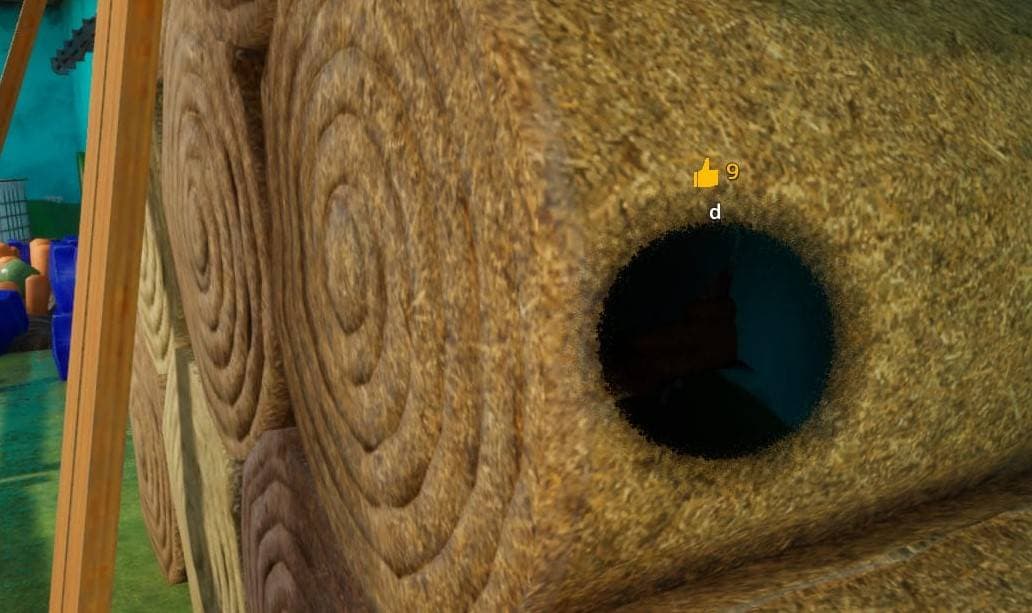
Hay roll gap
The circular hay roll naturally hides a compact body.
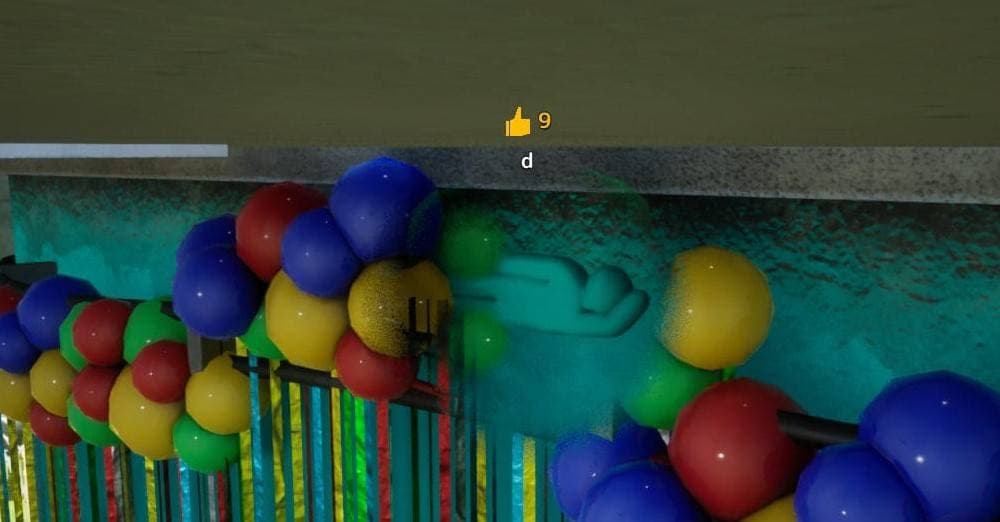
Balloon ball pit
Many bright circles make one fake object difficult to isolate.
Hider rule
Do not copy only the color. Copy the object group, scale, shadow, and pose that explain why your shape belongs there.
Seeker rule
Repeated props are the strongest hides, so count objects, check side profiles, and re-scan high corners after the first pass.
Map rule
The same spot can become obvious if everyone uses it. Rotate between object clusters, wall edges, shadows, and high angles.
Hide-and-seek mansion map
Mansion
Object clusters, shelves, plants, boxes, wall edges, and high ceiling props make this the broadest beginner map in the GamerSky spot list.

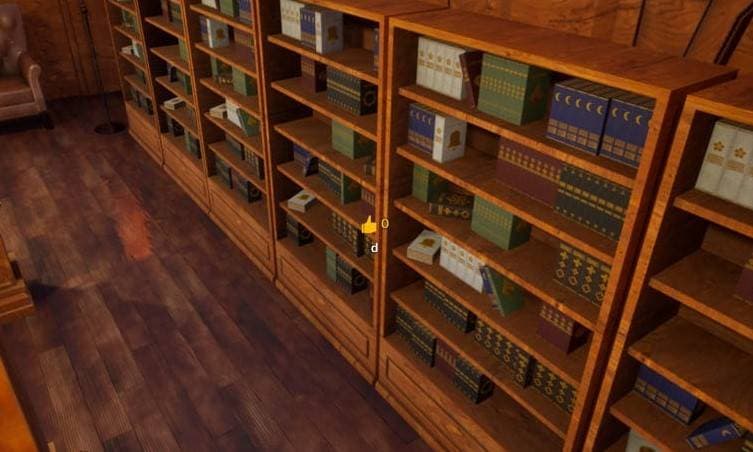
Bookcase row
Inside a full row of books on a mansion shelf.
Hider setup
Use muted book-spine colors and line your body up with the shelf face.
Why it works
One extra vertical shape is hard to count inside a dense book row.
Seeker check
Compare shelf depth and look for a spine that sits too far forward.
Wood shelf corner
At the dark joint where a wooden shelf turns the corner.
Hider setup
Match the wood tone and press into the shelf edge.
Why it works
The shadowed corner hides outline and makes the body read as trim.
Seeker check
Sweep shelf corners before leaving the room.
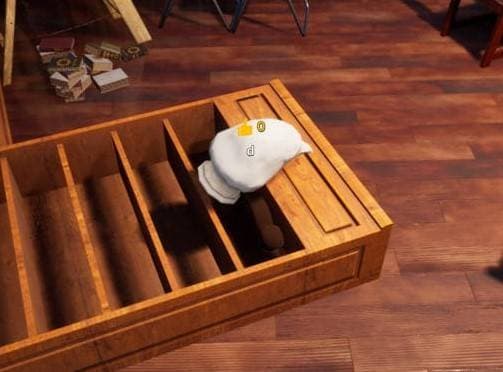
Wooden tray edge
Beside the shelf edge where wooden trays or boxes sit.
Hider setup
Flatten low and blend into the wood pieces.
Why it works
Small wooden objects already break up the shelf shape.
Seeker check
Look for a tray that is thicker or rounder than the others.

Dark cookware on counter
On the kitchen stove or counter among dark cookware.
Hider setup
Paint nearly black and keep a compact cookware-like shape.
Why it works
The counter already contains dark objects that mask scale.
Seeker check
Check the counter for objects that shift or have soft edges.

Bathroom cabinet edge
Above the bathroom sink near a pale cabinet and tiled wall.
Hider setup
Use light tile or cabinet colors and hold close to the wall.
Why it works
Pale surfaces soften the outline when viewed quickly.
Seeker check
Scan cabinet edges from multiple angles.

Exit sign wall corner
Near the white wall corner by the exit sign.
Hider setup
Copy the white wall and settle before seekers pass through.
Why it works
Traffic-heavy corners are easy to glance past.
Seeker check
Recheck busy doorways after the first scan.

Tile wall fabric
Beside a hanging cloth on the tiled wall.
Hider setup
Use beige fabric colors and mimic a flat hanging shape.
Why it works
The cloth gives a reason for another soft rectangle to exist.
Seeker check
Inspect fabric edges for a body outline.

Pink meat pile
Inside a pile of red and pink meat-like props.
Hider setup
Paint matching red-pink tones and curl into the pile.
Why it works
Irregular shapes hide limbs better than clean furniture does.
Seeker check
Look for a chunk that has smoother edges than the rest.

Blue storage box
Beside a blue box on the checkerboard floor.
Hider setup
Match the blue container and sit where another box feels plausible.
Why it works
Repeated storage items make a fake box harder to isolate.
Seeker check
Count boxes and check for inconsistent box height.

Vent gap
Pressed into a narrow ventilation gap.
Hider setup
Use dark gray tones and keep the body thin.
Why it works
The vent gap visually swallows small silhouettes.
Seeker check
Look inside vents instead of only checking room objects.

Behind vent channel
Behind a ventilation channel where shadows collect.
Hider setup
Use shadow gray and hide the outline behind the channel.
Why it works
Seekers often scan the vent face, not the space behind it.
Seeker check
Walk around vent channels and check rear shadows.

Boxes and easel floor
On the floor near cardboard boxes and an easel.
Hider setup
Use pale cardboard colors and settle into the prop cluster.
Why it works
Mixed art-room clutter makes one more object feel natural.
Seeker check
Check the floor around easels and box piles.

Rusty car prop
Beside or against a rusty vehicle prop.
Hider setup
Use rusty brown and dull metal colors.
Why it works
Large broken props make small defects less noticeable.
Seeker check
Look for extra lumps on the prop outline.

Green trash bin
Behind or against the large green trash bin.
Hider setup
Paint the same green and hug the bin body.
Why it works
The bin hides one side of the silhouette.
Seeker check
Circle trash bins instead of checking only their front.

Flowerpot row
In the middle of a shelf packed with flowerpots.
Hider setup
Become another pot shape and match clay or plant colors.
Why it works
A full pot row is hard to count under time pressure.
Seeker check
Check for one pot that lacks a real rim or plant top.

Cardboard stack
Inside or beside a stack of cardboard boxes.
Hider setup
Use cardboard brown and square off the body as much as possible.
Why it works
Box piles already create uneven edges and shadows.
Seeker check
Look for boxes with rounded corners.

Vases and clay pots
Among floor vases and clay pots.
Hider setup
Use terracotta colors and sit low between the pots.
Why it works
The collection has enough varied shapes to hide an extra one.
Seeker check
Check pot spacing and look for a soft silhouette.

Green wall doorframe
At the join between green wallpaper and a wooden door.
Hider setup
Match the wall or doorframe edge and stay flush with it.
Why it works
A vertical edge makes a body read as trim.
Seeker check
Inspect doorframes for extra thickness.

Ceiling balloons
High near colorful ceiling balloons and red cloth.
Hider setup
Use bright balloon or cloth colors and hold a high position.
Why it works
Seekers often keep their view at floor and shelf height.
Seeker check
Look up when a room has ceiling props.
Backrooms map
Backrooms
Yellow corridors, warning signs, office clutter, metal storage, sofas, toilets, and industrial barrels create strong color-matching spots.
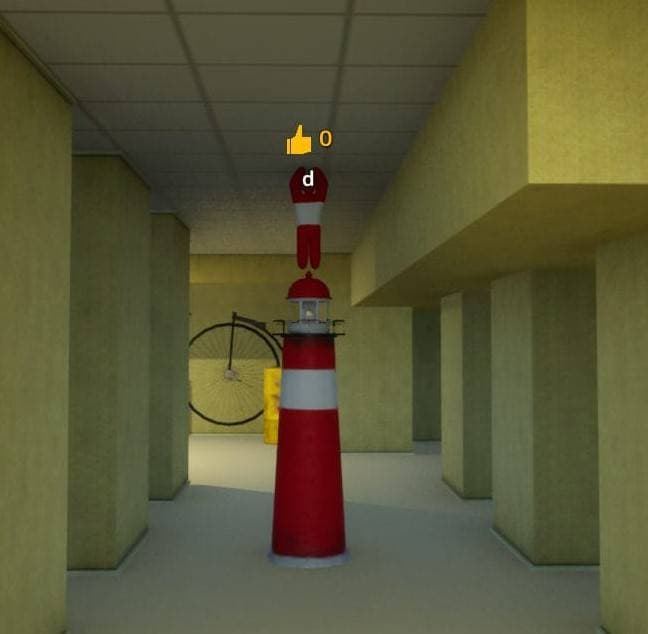
Red-white tower prop
On top of a red and white striped prop in a yellow corridor.
Hider setup
Copy the red-white stripe rhythm and stack onto the object.
Why it works
The loud pattern distracts from the extra silhouette.
Seeker check
Check striped props for added height.
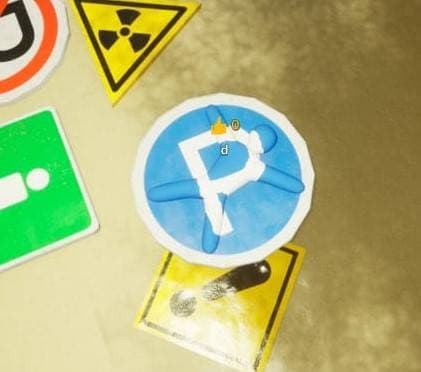
Warning sign cluster
Among parking, warning, and road-sign props.
Hider setup
Use bold sign colors and hide inside the visual noise.
Why it works
Busy sign shapes make counting individual props hard.
Seeker check
Look for a sign that is off-angle or too thick.
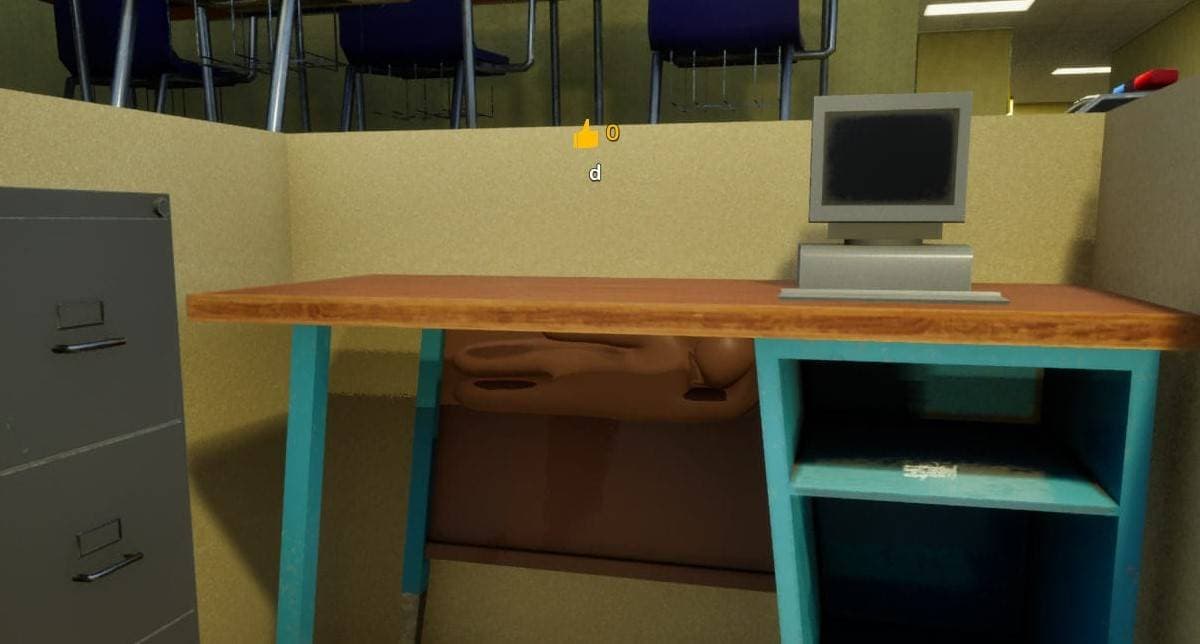
Retro computer desk
On an office desk beside a beige retro computer.
Hider setup
Use beige case colors and stay compact on the tabletop.
Why it works
Desk clutter gives another beige block a reason to exist.
Seeker check
Check desk objects for scale and shadow mismatch.

Dark bottle shelf
On a dim shelf filled with bottles and cans.
Hider setup
Use dark bottle colors and rely on the shelf shadow.
Why it works
Small repeated containers hide narrow body shapes well.
Seeker check
Scan bottle shelves for one oversized container.

Empty yellow corner
In a sparse yellow room corner.
Hider setup
Match the yellow wall precisely and minimize shadow.
Why it works
A perfect wall match can win, but the spot has little cover.
Seeker check
Look for surface patches that do not match lighting.

Behind exit sign
Behind or against an exit sign on the wall.
Hider setup
Use matching wall and sign colors while staying flat.
Why it works
Seekers tend to read signs as navigation, not hiding props.
Seeker check
Inspect sign backs and wall-mounted rectangles.

Cake table set
At a metal table and chair set with a cake.
Hider setup
Blend into the tabletop items or chair color.
Why it works
Mixed table objects let a compact hider disappear quickly.
Seeker check
Check tabletop clutter and chair undersides.

Metal locker side
Along the side of a dark metal storage locker.
Hider setup
Paint iron gray and align with the locker side panel.
Why it works
The flat locker wall can hide a body if the edge is clean.
Seeker check
Check locker sides for extra bulges.

Blue sofa planter
On a blue sofa near a flowerpot.
Hider setup
Use sofa blue and sink into the seat area.
Why it works
The planter draws attention away from the seat outline.
Seeker check
Inspect sofa cushions for shapes that are not cushion seams.

Wood bench pile
Inside a cluster of wooden benches and tables.
Hider setup
Use wood colors and hide along the furniture grain.
Why it works
Furniture piles create many overlapping straight lines.
Seeker check
Look under benches and along table legs.

Leather armchair shadow
Behind a brown leather armchair.
Hider setup
Use leather brown and sit inside the chair shadow.
Why it works
The chair back hides most of the silhouette.
Seeker check
Walk behind armchairs before moving on.

Yellow industrial barrel
Beside yellow industrial barrels.
Hider setup
Become another yellow container and match the barrel height.
Why it works
A repeated container group is difficult to count quickly.
Seeker check
Check barrel count and spacing.

Toilet cluster
Behind a group of toilets.
Hider setup
Use white ceramic colors and keep low behind the fixtures.
Why it works
Object repetition makes one extra white shape less obvious.
Seeker check
Check behind every repeated toilet group.

Speed sign edge
Beside a bright speed-limit sign.
Hider setup
Use the sign's bold colors and hold close to the sign edge.
Why it works
The strong sign color makes smaller mismatches harder to read.
Seeker check
Inspect signs from the side, not only the front.

Bright white room
Inside the brightest white room.
Hider setup
Paint completely before committing; plain white is too visible.
Why it works
A clean white match can work only when the color is exact.
Seeker check
Search for shadows and outlines on bright walls.
Penguin hotel map
Penguin Hotel
Bright furniture, penguin props, toilets, armor, balloons, columns, and high corners make this a smaller but very readable map set.
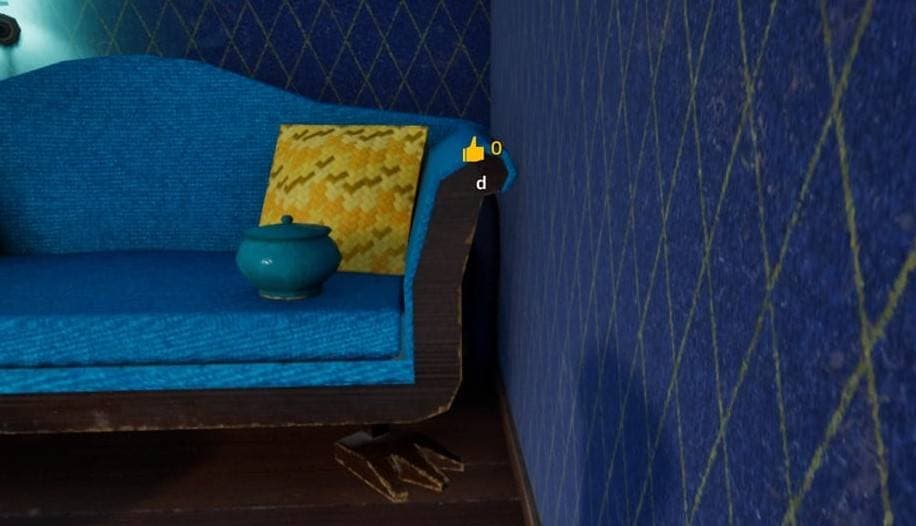
Blue sofa corner
In the corner of a blue sofa near a yellow cushion and teapot.
Hider setup
Use blue upholstery or yellow cushion colors and stay compact.
Why it works
The sofa corner already contains several bright focal points.
Seeker check
Inspect cushions and teapot-side corners.
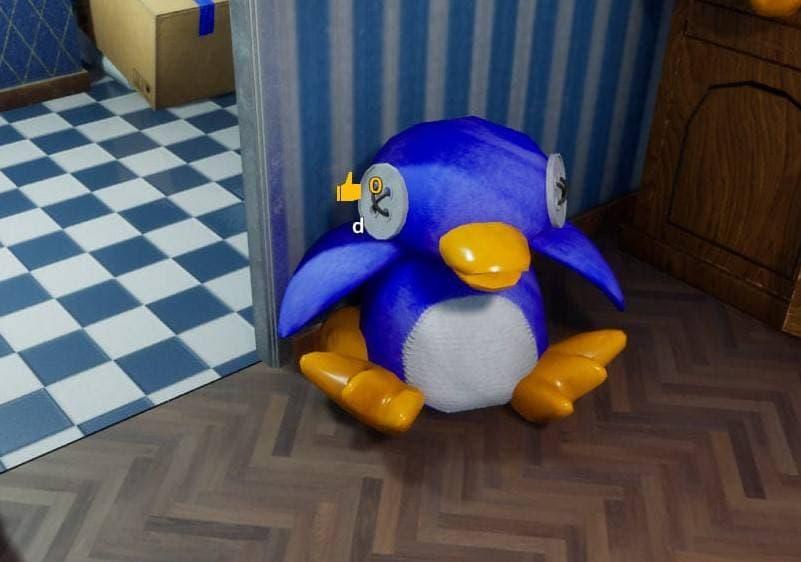
Blue penguin mascot corner
At the corner beside a large blue penguin prop.
Hider setup
Match the penguin's blue and white palette.
Why it works
The oversized mascot makes an extra blue shape feel normal.
Seeker check
Check the mascot's sides and base.
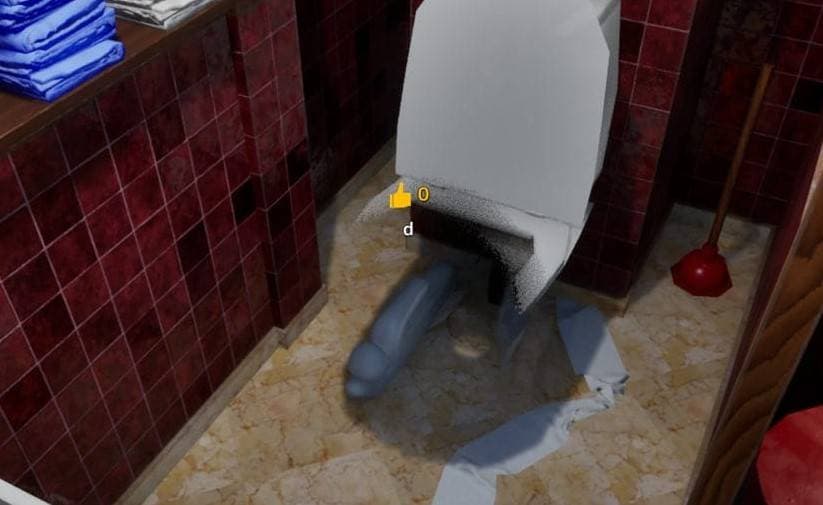
Toilet base
At the base of a white toilet.
Hider setup
Use ceramic white and stay tight to the floor.
Why it works
The fixture base hides a low, rounded silhouette.
Seeker check
Look under and around bathroom fixtures.

Armor statue gap
Behind an armor statue.
Hider setup
Use dark metal gray and tuck into the statue gap.
Why it works
The statue blocks direct view while metal colors absorb detail.
Seeker check
Circle statues and check the back gap.

Penguin prop shadow
In the shadow behind a penguin prop.
Hider setup
Use deep blue or black and hide in the prop shadow.
Why it works
A shadowed mascot edge can erase body detail.
Seeker check
Check behind mascot props with a close pass.

Balloon pile by marble column
Inside blue and orange balloons near a marble column.
Hider setup
Use balloon colors and hide as another rounded object.
Why it works
Bright balloon clusters hide color variation well.
Seeker check
Look for one balloon that does not move or reflect correctly.

High dark corner
Near the ceiling in a dark wall corner.
Hider setup
Use shadow tones and rely on height.
Why it works
Seekers often miss high angles during fast sweeps.
Seeker check
Look up at dark ceiling corners.

Blue doorframe edge
Beside a blue doorframe near checkerboard flooring.
Hider setup
Match the blue frame and line up with the vertical edge.
Why it works
Doorframes naturally create body-sized vertical strips.
Seeker check
Inspect frame thickness and edge shadows.
Sewer map
Sewer
Pipes, pallets, trash cans, barrels, sandbags, graffiti, drainage tunnels, and dark rooms reward low-light shape control.
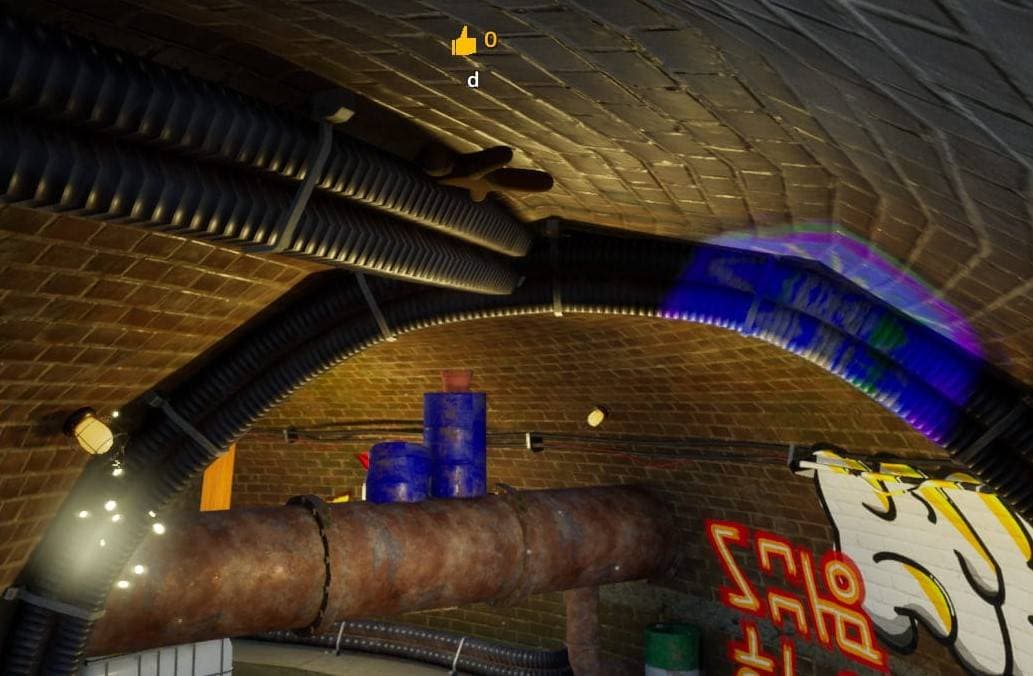
Rusty tunnel pipe
Beside a large pipe at the top of a brick tunnel.
Hider setup
Use rust and dark pipe tones while hugging the pipe line.
Why it works
High pipe routes are outside many seeker sightlines.
Seeker check
Look up along tunnel pipes.
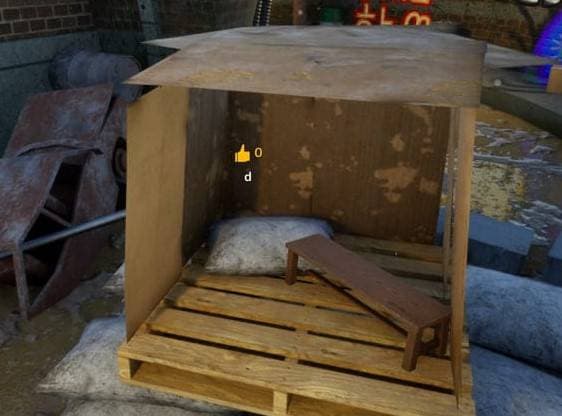
Wood pallet frame
Inside the gap of a wooden pallet frame.
Hider setup
Use wood brown and fit between the slats.
Why it works
Pallet slats naturally break the body outline.
Seeker check
Check through pallet gaps.
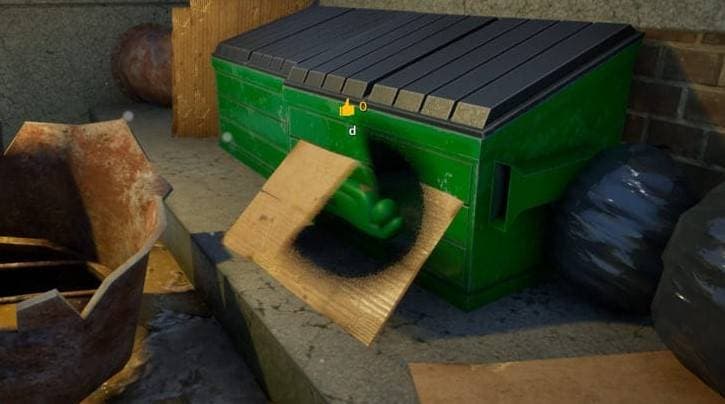
Green bin rim
At the opening of a large green trash bin.
Hider setup
Match the green rim and crouch into the lip.
Why it works
The bin rim hides body edges from floor-level view.
Seeker check
Check trash bin openings directly.

Orange barrel and tires
Beside orange-red barrels and tire piles.
Hider setup
Become another orange container in the prop cluster.
Why it works
Barrels and tires already create chunky, repeated forms.
Seeker check
Count barrels and inspect gaps near tire piles.

Gray sandbags
Beside stacked gray sandbags.
Hider setup
Use cement gray and fold into the bag pile.
Why it works
Sandbags have irregular edges that hide a curled body.
Seeker check
Look for a bag that lacks seams or has soft movement.

Green-white barrel gap
Inside gaps between stacked green and white striped barrels.
Hider setup
Copy the barrel stripe colors and squeeze into the stack.
Why it works
Striped barrels can hide color breaks if alignment is close.
Seeker check
Look between stacked barrels, not only at their fronts.

Red octopus graffiti
In front of red graffiti on a brick wall.
Hider setup
Use bright red and flatten into the graffiti color field.
Why it works
The wall art makes an unusual red shape feel intentional.
Seeker check
Check graffiti for raised or moving patches.

Behind wood cabinet
Behind a wooden cabinet.
Hider setup
Use dark wood and stay in the rear shadow.
Why it works
Seekers often check cabinet fronts first.
Seeker check
Walk around storage furniture.

Graffiti and barrel chaos
Between a colorful graffiti wall and barrel pile.
Hider setup
Use the loudest nearby colors and hide inside the clutter.
Why it works
Visual noise makes imperfect paint less obvious.
Seeker check
Inspect cluttered graffiti zones slowly.

Green barrel by grate ramp
Beside green barrels near a metal grate ramp.
Hider setup
Match the barrel green and use the ramp edge to cut the outline.
Why it works
The ramp and barrel create overlapping hard edges.
Seeker check
Check barrel sides along ramps.

Gray water tank
Beside a large gray water tank or bucket.
Hider setup
Use metal gray and press against the tank wall.
Why it works
Gray metal surfaces hide subtle body curves in low light.
Seeker check
Check tank sides for extra mass.

Rust and paint junction
Where rusty pipes meet splashed wall paint.
Hider setup
Use mottled rust and paint colors instead of one flat tone.
Why it works
Patchy textures hide small color errors.
Seeker check
Look for a patch with a body-shaped boundary.

Blue barrel corner
Near a blue barrel on the floor by graffiti.
Hider setup
Use blue and crouch into the corner.
Why it works
The corner and barrel hide two sides of the silhouette.
Seeker check
Check low corners beside barrels.

Blue graffiti drain
At a drainage tunnel opening beside blue graffiti text.
Hider setup
Use blue or dark tunnel colors and hug the opening.
Why it works
The tunnel edge and wall text split seeker attention.
Seeker check
Inspect drain mouths, especially near graffiti.

Dark drain side
On the opposite side of the same drainage opening.
Hider setup
Use dark gray or black and stay inside the blind side.
Why it works
The pipe mouth creates a small visual dead zone.
Seeker check
Check both sides of tunnel mouths.

Purple cleaner bottle
In a brick-wall corner beside a purple cleaner bottle.
Hider setup
Use matching purple and keep the shape narrow.
Why it works
A small bottle-like form can vanish in a corner.
Seeker check
Check bright bottles for size mismatch.

High ceiling pipe
Beside a large pipe on the ceiling.
Hider setup
Use pipe colors and hold high above normal eye level.
Why it works
Most seekers clear floor clutter before checking the ceiling.
Seeker check
Look up at every major pipe run.

Dark room table
Beside a wooden table in a dim room.
Hider setup
Use low-light wood and shadow colors.
Why it works
Dim rooms forgive imperfect paint if movement is minimal.
Seeker check
Sweep table legs and nearby shadows.
Indoor countryside map
Indoor Countryside
Hay blocks, pumpkins, gas cylinders, feed troughs, fences, balloons, crates, and grass-colored props make this map about repeated farm clutter.
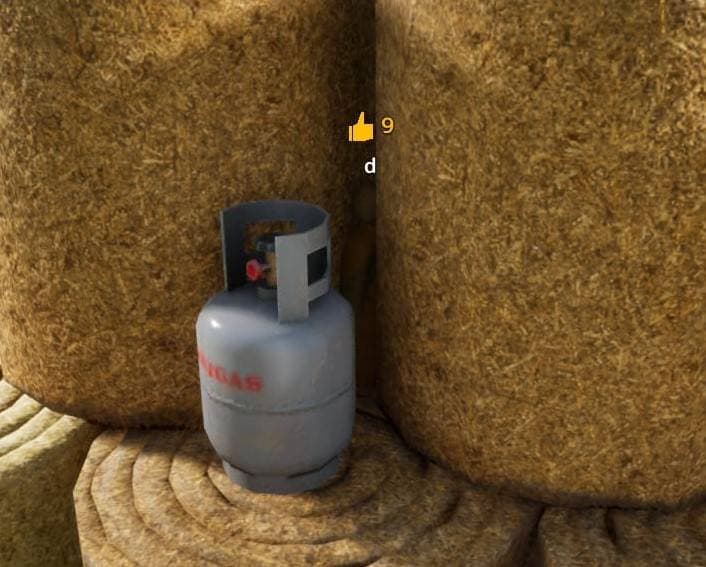
Hay pile with gray cylinder
Inside a hay pile near a gray gas cylinder.
Hider setup
Use hay yellow and tuck into the pile beside the cylinder.
Why it works
Hay texture hides rough body edges.
Seeker check
Check hay piles around cylinders.
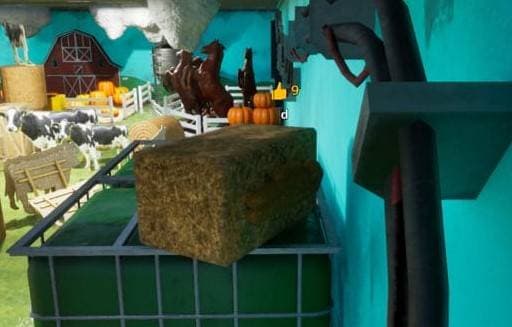
Hay brick props
Beside rectangular hay bales in the farm prop area.
Hider setup
Paint straw yellow and square the pose.
Why it works
Repeated hay blocks make another block feel normal.
Seeker check
Look for hay blocks with rounded edges.
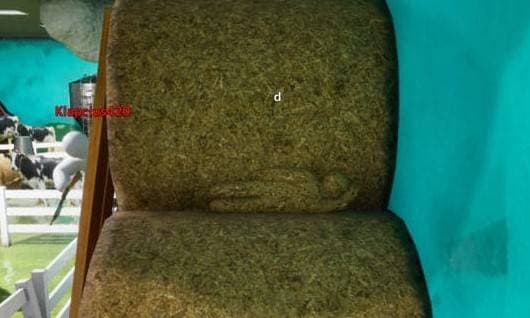
Grass hay block
On grass beside square hay bales.
Hider setup
Use straw colors and align with the bale stack.
Why it works
The grass setting makes hay clutter expected.
Seeker check
Check bale count and stack symmetry.

Hay roll gap
In the center gap of rolled hay.
Hider setup
Use straw colors and curl into the roll opening.
Why it works
The circular hay roll naturally hides a compact body.
Seeker check
Look inside hay roll centers.

Stacked blue buckets
Beside a stack of blue buckets.
Hider setup
Use bucket blue and hug the stack.
Why it works
Bucket stacks are repeated, simple shapes.
Seeker check
Check for one bucket-shaped object with body curves.

Feed trough opening
At the opening of a dark green metal feed trough.
Hider setup
Match the trough green and lie along the rim.
Why it works
The opening breaks the silhouette and creates shadow.
Seeker check
Check trough openings from above.

Pumpkins by barn wall
Near pumpkins against red barn boards.
Hider setup
Use pumpkin orange and become one more round prop.
Why it works
Pumpkin clusters make extra orange shapes believable.
Seeker check
Check pumpkin count and spacing.

On top of hay
Directly on a highlighted hay pile.
Hider setup
Use straw yellow and lie flat on the hay surface.
Why it works
The hay surface can absorb a flat body if color is close.
Seeker check
Look for raised shapes on top of hay piles.

Pumpkin and hay corner
In a hay corner beside pumpkins.
Hider setup
Match either straw or pumpkin orange and stay tight to the corner.
Why it works
The corner hides part of the body behind farm clutter.
Seeker check
Check corners where pumpkins meet hay.

Red barn wall and horse prop
Against a red barn wall near a horse prop.
Hider setup
Use barn-wall red and avoid casting a separate outline.
Why it works
The horse prop distracts seekers from the flat wall area.
Seeker check
Inspect open red wall sections for imperfect paint.

Gray cylinder on grass
Beside a gray gas cylinder lying on the grass.
Hider setup
Use metal gray and align with the cylinder body.
Why it works
A low cylinder creates cover and color reference.
Seeker check
Check both ends of cylinders.

Stones and wire roll
Beside gray stones and a rolled wire mesh.
Hider setup
Use stone gray or wire-metal colors in the clutter.
Why it works
Mixed gray objects hide uneven silhouettes.
Seeker check
Check the edges of wire and stone piles.

Cow and balloon props
Inside a colorful toy-like cluster with cow props and balloons.
Hider setup
Use bright colors and blend into the prop pile.
Why it works
Colorful toy clutter makes exact object identity less important.
Seeker check
Check bright clusters for shapes that do not match the set.

Balloon ball pit
In a pit full of colorful balloon-like balls.
Hider setup
Use saturated colors and keep the body rounded or low.
Why it works
Many bright circles make one fake object difficult to isolate.
Seeker check
Look for a cluster that has a body-sized outline.

Crate, pumpkin, and hay set
Beside wooden crates, pumpkins, and hay.
Hider setup
Use wood grain or pumpkin orange and sit inside the mixed stack.
Why it works
Three prop materials create flexible hiding colors.
Seeker check
Inspect crate edges and pumpkin gaps.

White fence rail
Beside a white fence near pumpkins.
Hider setup
Use fence white and line up with the rail or post.
Why it works
Fence rails already create repeated white strips.
Seeker check
Look for one rail or post that is too thick.

Corner pumpkins by fence
In a corner where pumpkins sit near a white fence.
Hider setup
Use pumpkin orange and stay low in the corner.
Why it works
The fence and corner block several sightlines.
Seeker check
Check pumpkin corners from the side.
How to use this page
Pick one map, test three easy spots, then practice the seeker check against your own hiding setup. If a spot is popular in your lobby, rotate to a similar object group instead of repeating the exact same location.
Reference guide
Spot candidates are rewritten from a public guide list, with local screenshots hosted on this site.
Read the reference article